
Post Purchase & Upsell
One-click upsells between checkout and the thank you page
Show an offer after payment. Buyers accept in one tap and it joins the order they just placed.
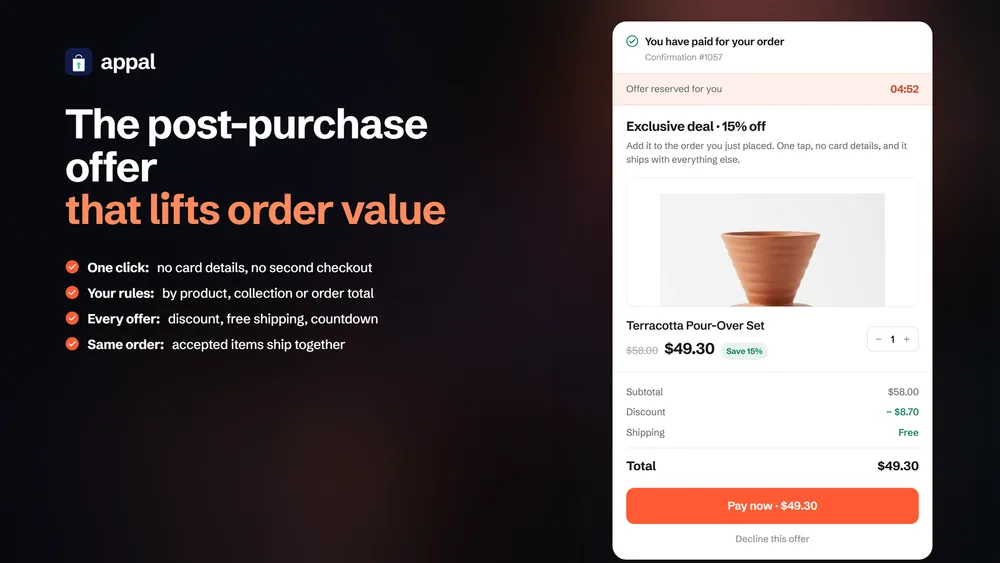
What it does
Buyers who have just paid are the easiest people to sell to, and they are one click away from leaving. Appal puts a single offer in front of them before the thank you page. Accepting takes one tap. The item joins the order they already placed, charged to the card on file, on the same shipment. There is no second checkout and nothing to re-enter.
- Add an item to the order the buyer just paid for, in a single tap
- Pick the offer product automatically from the cart, or choose it yourself
- Trigger funnels by product, collection, order total, or every order
- Set a discount, free shipping and a countdown on each offer
- See offers shown, accepted and declined, per funnel and per order
How it works
- 01
The buyer pays
Checkout completes exactly as it does today. Nothing about the payment flow changes, and nothing is added to the theme.
- 02
One offer appears
Between the payment and the thank you page, Shopify hands the buyer to the post-purchase page. Appal renders a single offer there.
- 03
One tap accepts it
The item is added to the order that was just placed and charged to the card already on file. Same order, same shipment, no second checkout.
Good to know
Written down here, not discovered after you install.
- Roughly a quarter of orders are eligible for a post-purchase page. Ineligible orders go straight to the thank you page, and the order browser shows the outcome either way.
- A buyer sees at most two offers in a row: one upsell, and one downsell if they decline.
- Accelerated checkouts such as Shop Pay and PayPal skip the post-purchase step by design. That is Shopify behaviour, not an app limitation.
- Requires selecting Appal under Settings, Checkout, Post-purchase page in your Shopify admin.
Install Post Purchase & Upsell
$14.99 per month, billed through Shopify. 14-day free trial.


