
A/B Testing & CRO
Split-test real Shopify templates, with no flicker and no guessing
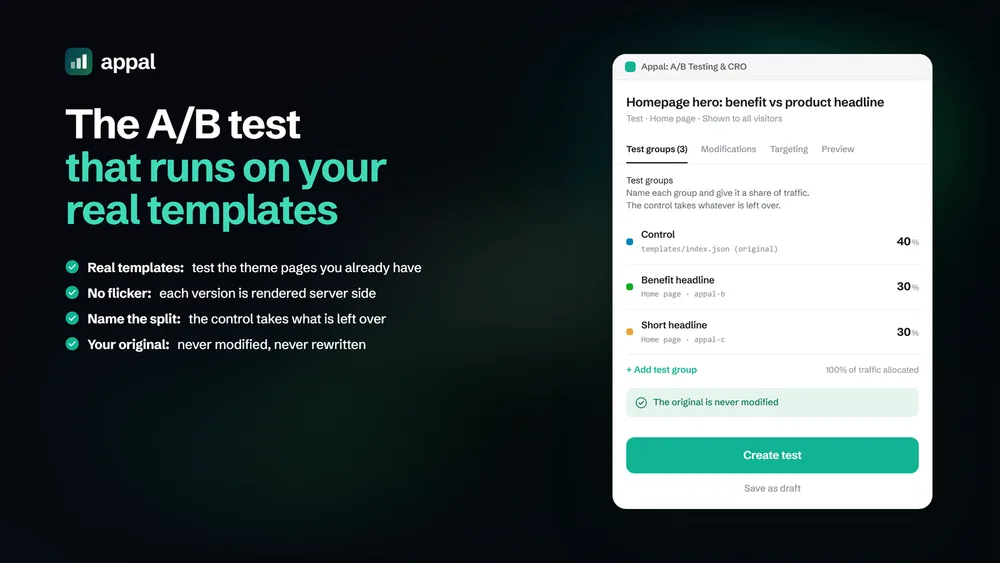
Test template against template. Pages still render on the server, so shoppers never see the switch.
What it does
Most testing tools rewrite the page in the browser after it loads, which is why shoppers see a flash of the wrong version. Appal splits traffic between real Shopify templates instead, so every version renders server-side like any other page on your store. You get the result without paying for it in load time.
- Test real Shopify templates, rendered server-side with no flicker
- Measure conversion rate, revenue per visitor or average order value
- Target by device, by new versus returning, by UTM source and by country
- Revenue attributed from the Shopify order webhook, not from a browser guess
- Confidence scored per variant, so you know when a result is actually a result
How it works
- 01
Duplicate a template
Copy the template you want to test and give it a suffix, then edit the copy to hold your B version. It is a normal Shopify template, editable in the theme editor.
- 02
Split the traffic
Choose the templates, name the versions and set the split. A small runtime served from Shopify’s CDN assigns each visitor and keeps them on the same version.
- 03
Read the result
Exposures come from the storefront, orders come from Shopify’s order webhook. Appal scores confidence per variant and tells you which template to keep.
Good to know
Written down here, not discovered after you install.
- Because versions are real templates, pages render on the server. There is no client-side rewrite and therefore no flash of the original.
- Personalisation mode serves a chosen version to a segment permanently, instead of splitting traffic.
- Your theme is never changed for you. Ending a test tells you which template won; keeping it is your decision.
- Nothing is served to shoppers until the app embed is enabled and the test is started.
Install A/B Testing & CRO
Free, with every feature on the free plan.


